Loading...
iNVEEY Loyalty
A Loyalty Card Your Customers
Keep in Their Wallet.
We set up a digital punch card for your business in Apple Wallet and Google Wallet. Customers join by scanning a card at the counter, earn a punch each visit, and unlock a reward you choose. No app to download, no plastic to lose, and the customer list belongs to you.
A product of iNVEEY. Also included with Rico.

Try it yourself
Scan to get the iNVEEY punch card.
Point your phone camera at the code, enter a name and email, and the card lands in Apple Wallet or Google Wallet. It is the same sign-up your customers will see.
On your phone? Tap to joinWhat it is
The punch card your customers already know, without the paper.
Paper punch cards get lost, forgotten, and copied. Loyalty apps never get downloaded. A wallet pass is different: it lives next to the customer's credit cards and boarding passes, updates itself the moment they are punched, and your specials pop up on iPhone lock screens.
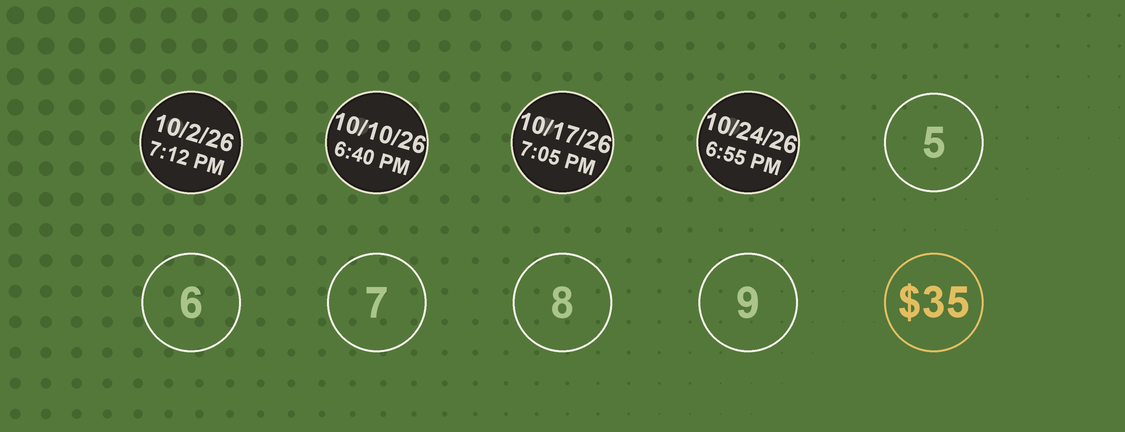
iNVEEY Loyalty gives your business its own branded pass. Your logo, your colors, your reward rule. Every visit is recorded with a date stamp on the card itself, so the customer sees the reward getting closer and your team sees exactly who comes back and how often.
Loyalty is a product of iNVEEY. It also comes included with Rico, the AI back-office iNVEEY builds for independent businesses. Take Loyalty on its own, or with Rico, where Maya writes and sends your specials and the scanner sits in the Rico app. Either way your loyalty program is handled by the team that set it up, not by a third-party subscription that holds your customers hostage.
Wallet
Your Business
Punches
4 of 10
Member
Your Guest
Valued loyal guest since
Oct 2, 2026
SCAN AT THE REGISTER
How It Works
Join. Visit. Reward.
Three steps for the customer, and none of them involve an app store. Your team only ever scans a card.
Step One
Join
The customer scans a printed QR card at the counter with their phone camera, enters a name and email, and the pass lands in Apple Wallet or Google Wallet in seconds. Email is the account, so one guest gets one card.
Step Two
Visit
At checkout your staff scans the card on a password-protected page on your own phone or tablet, or in the Rico app on your iPad with Rico. One punch per visit, one per day, and the card on the customer's phone updates instantly with a date stamp on the hole.
Step Three
Reward
The tenth punch unlocks the reward you chose, applied at the register through your point-of-sale. The card resets and the guest keeps going, with their join date and visit history intact.
What Your Business Gets
Everything a loyalty program needs, run for you.
Each item below is part of the service, not an add-on. We host it, maintain it, and keep the passes updating.
Branded Wallet Pass
Your logo, colors, and card face in Apple Wallet and Google Wallet, issued under your business name.
Printed Join Cards
Counter cards with a QR code and a unique code each. Scan to join; a blank card stays blank for the next guest.
Staff Scanner
A password-protected page on your own phone or tablet, no app to install (with Rico, it is in the Rico app on your iPad). It punches the card, shows the visit count, and flags a card already scanned today.
A Customer List You Own
Every cardholder's name, email, join date, visit count and last visit, exported nightly to your own Drive folder.
Visit History
Every punch is recorded with date and time, on the card for the guest and in your dashboard for you.
Email Your Cardholders
Write a special with the built-in writer, preview it, and press Send. It goes out from your own email, with each guest's punch count merged in and an unsubscribe link on every message. With Rico, Maya writes and sends it for you.
Your Reward Rules
Punches per reward, the reward itself, and one-per-day limits are set for your business, not from a menu of presets.
Runs on Your Own Rico Box
The program runs on your on-site Rico box, not a shared server. We maintain it, push every punch to the phone instantly, and back it up every night.
Setup
We Set It Up. You Hand Out Cards.
Turnkey. You do not change your point-of-sale or your website, and your team learns the scanner in about fifteen minutes.
Phase One
Design
- We take your logo and colors and build the card face and the wallet pass
- You choose the reward, the number of visits to earn it, and the fine print
- You approve the card on your own phone before anything prints
Phase Two
Register and Print
- Apple Wallet and Google Wallet passes are registered for your business
- Your QR join cards are ready for the counter: 500 printed for $75, or a file to print yourself
- The reward is set up in your point-of-sale so staff apply it in one step
Phase Three
Train and Launch
- The scanner goes live on your own phones or tablets (in the Rico app with Rico), and the team is trained
- Your customer list is backed up every night
- The first cards go out, and we watch the first week with you
Included with setup
- Branded pass in Apple Wallet and Google Wallet
- Card face artwork and reward rules
- QR join cards: 500 printed for $75, or print your own
- Staff scanner on your own devices
- Point-of-sale reward setup (with Rico)
- Cardholder dashboard and nightly export
- Specials to your cardholders, sent from your own email
- Backed up nightly, on your own Rico box with Rico
Pricing
Two ways to run it.
Take Loyalty on its own, or take Rico and Loyalty comes with it. Either way the card is yours, the guest list is yours, and nothing about your customers is sold or shared.
Loyalty on its own
Starting at
$750
+ $149 / month
One location, month to month. Cancel any time.
Branded pass in Apple Wallet and Google Wallet
Card face artwork and reward rules
500 printed QR join cards: $75
Staff scan page on your own devices
Cardholder list, exported nightly
Specials sent to your cardholders from your own email
Set up for you, start to finish
Extra location $250, then $49 a month
Email setup on your own domain, so specials reach the inbox: $195 one time
Mailbox in your business name, if you need one: $15 a month
Want specials posted to your website and social media automatically? That is Rico. Move up within twelve months and the $750 setup comes off the price in full.
Buy Loyalty NowOr book a 15-minute callIncluded with Rico
$7,500
+ $1,550 / month
The full Rico program with Loyalty included, on your own on-site box.
Everything in Loyalty on its own, plus 500 printed join cards
Reward set up in your point-of-sale
Staff scanner in the Rico app, plus training
Specials written and sent by Maya to your website, social media and cardholders
Runs on your own on-site Rico box, backed up nightly
Everything else Rico does for your business
No separate Loyalty subscription. It is part of the monthly retainer.
Buy Rico NowOr book a 15-minute callSee everything Rico does. Meet Rico
Why It Works
Low friction for the guest. Real data for you.
A loyalty program only pays off when customers actually carry it. A wallet pass is already on the phone they bring every time.
0 apps
to download. The pass goes into the wallet the phone already has, so joining takes seconds and nobody forgets a password.
1 scan
to join and one scan per visit. Your staff never types a name or looks anyone up.
Every visit
is logged with a date and time, so you know your regulars by name and can reach them when it is quiet.
100% yours
The list, the visit history, and the relationship stay with your business, exported to your own files every night.
Built for restaurants, cafes, salons, and any counter where the same faces come back. If your customers carry a phone, they can carry your card.
Ready to Start?
15 minutes is all it takes.
Tell us about your business and your reward. We will show you the card on your own phone and walk through the setup.